Showing posts with label "doral chamber of commerce". Show all posts

Monday, February 6, 2017

10 Ways to Improve your Digital Marketing Strategy! SEO, Social Media, Web Design and Internet Marketing!


10 Ways to Improve your Digital Marketing Strategy!

  1. Join your local Chamber of Commerce, it is a great way to network and build your professional standing.
  2. Attend community events and network, network, network!
  3. Take a professional headshot and update your professional presence to reflect your commitment to your professional persona!
  4. When meeting someone, always hand out two business cards only after you asked for them, one for them to keep, and one for them to hand out to other professionals.
  5. Add a signature block to your outgoing e-mail that includes your name, firm name (or simply attorney at law) city, state and phone number.
  6. Send birthday and holiday cards to colleagues and clients. A simple online calendar can help you coordinate and send reminders. It works as a nice gesture and a way to build your client/professional relationships
  7. Have lunch or coffee breaks with attorneys who practice in other areas and be sure you have plenty of each other’s cards for referrals.
  8. Join a local law-referral group and attend their events. Grow your professional network and interact with fellow attorneys that could potentially help you find business in the future!
  9. Create a website that optimizes your search engine results. Don’t get lost on the second page of search engines, maximize your online marketing results by understanding SEO!
  10. Update your social media and website constantly, don’t let your marketing messages become irrelevant.

If you are an attorney-of-law and are looking for extra networking opportunities check out: The Attorney Marketing Annex for Miami’s best lawyer referral service. Click Here for more information!


Thursday, June 9, 2016

SEO Search Engine Optimization - For Dummies!

"The New SEO (Search Engine Optimization)  - For Dummies"

by Manny Sarmiento – President / CEO of New Media, New Marketing, Inc.

The New World of SEO means that you can optimize your own website and blog, resulting in high search results rankings at zero or minimal cost. You can get to the top of Google without extensive experience or expensive investments! 


Old school SEO meant having to pay a bunch of money to “SEO Experts” who promised high rankings on Google, Bing and Yahoo. Sadly, they didn’t necessarily fulfill these promises. What made it possible for these so-called “SEO Experts” to charge you a bunch of money was the ignorance of business owners, CEOs and the like.

This ignorance and lack of knowledge is currently widespread. Most business owners are bombarded by ads for SEO. Some of these SEO firms can get you results by making suggestions and changes to your website. So, don’t discard all those emails you receive.

Personally, I don’t like paying for SEO. Especially, when there is no need to do so. The following information on SEO will make it possible (with no guarantees – sorry!) to get to the top of the search engines by optimizing your websites on your own.

First, here is the history of SEO in a brief manner. When Al Gore invented the internet, (haha) Yahoo dominated the SEO and Search engine universe. For $299 Yahoo would consider looking at your website and indexing it on their search engine. Since then the “SEO Experts” started appearing with all the illustrious promises of Search Engine domination. But recently Google changed the playing field. It is now possible for you to get incredible search engine rankings and appear at the top of the search engines without paying for it. Here’s how.

The SEO “Secret”
The “secret” to SEO domination on Google is… that there is no secret! Google only wants one thing. That you provide a real content, keyword-rich, target market, relevant website! If you provide a website that contains these four elements you will most likely appear high on the search engines, maybe even on the first page, in the first few listings.

As a matter of fact Google provides all the dos and don’ts for SEO on several Google produced resources. Here are a few:
•    Google Search Engine Guidelines
•    Google SEO Starter Guide
•    Google SEO Videos
•    Google Search-based Keyword Tool

These free SEO tools from Google can be found on www.nmx2,com/resources

The most important one of these tools is the Google Search-based Keyword Tool. The tool helps you determine keywords or keyword phrases that your target market searches for to find your type of business. Simply enter the keywords you believe your target market searches for and Google gives you “Keyword Ideas” that are relevant, actual searches per month.

With this Google keyword tool you will be able to create a master list of target market keywords. You will then use these keywords in all of your website content, social media profiles and updates, blog contents, pictures, usernames, and any other online tools.

If your content is real and relevant to the search terms typed into the Google search box, Google will return the most relevant results in the search engine results page (SERP). This is the “secret” to appearing high in a Google search result. Not much of a secret, is it?

If you’ve been paying attention to the web, you’ve most likely heard that Google “has a new update”. Google is creative with the names it gives it’s algorithm changes. Algorithm is a fancy name for the mathematical calculations and choices it’s servers use to determine relevant terms. If you are listening to what I am saying in this article, then you know to ignore and stop panicking about these updates. 

As long as you are providing real, keyword-rich, target market, relevant content and the user types in the correct keywords that your website is optimized for, your website will appear on a search result.

Another secret of SEO and Google’s search engine is: You may appear at the top of Google for one set of keywords and nowhere to be found for another set of keywords. This means that you must make a choice about which keywords you wish to use in order to have your website appear at the top of Google.

Search Engine Optimization SEO Mechanics and Website Structure Requirements

Search Engine Optimization is not just about writing real, keyword-rich, target market relevant content. Although this is the most important thing Google looks for, it is not the only thing. Here is a list of the most important mechanical things your website must have in order to appear high on the search engines. Keep in mind that even if the mechanics are good, Google gives no guarantees.

•    Keyword Rich Title Tag
•    Keyword Rich Description Meta Tag
•    Keyword Meta Tag
•    <H1> & <H2> with Keywords
•    Keyword Image Files Names
•    Keyword Image Alt-Tags
•    Internal Links & External Links with Keywords

Along with the mechanics of the website there are other important, off-website things you must do to improve your website rankings on Google and other search engines.

1.    Acquire backlinks to your website. Google will give your website “Google Love” for links back to your website from other, external websites. The more relevant the site is, the more Google “Love” you will receive and the greater the chance of getting ranked higher on Google. Links from irrelevant sites will not get you Google “Love”.

2.    Create and submit two types of sitemaps, an .html sitemap and an .xml sitemap. Google lets you do this at their Webmaster Tools website.

3.    Submit your website manually to Google, Bing and Yahoo. Yahoo is submitted on the same website as Bing, at the same time.

4.    Get traffic to your website and engage them when they land on your website. Do everything possible, online and offline, to get visitors to your website. You can acquire lots of Google Love by increasing the number of unique visitors and getting them to take actions on your website. The “Call to Action” is one of the most important engagement tools for your site. Ask your visitors to do something, such as, watch a video, fill in a form, visit another page on your site.

Other than optimization, the paradigm I teach my SEO students is that social media is an important tool for getting ranked on Google. Many social media sites, if properly keyword optimized, may appear on a search on the search engines. Below is a list of some of the best sites (currently) for SEO:

1.    Merchant Circle
2.    YouTube
3.    Yelp
4.    YellowPages.com
5.    SuperYellowPages
6.    Foursquare
7.    LinkedIn
8.    Blogger & WordPress
9.    Facebook Business Pages
10.    Google Plus
11.    Twitter
12.    PRLog

I’ve studied Search Engine Optimization extensively. I am confident that when you optimize your pages with the tools that I have given you, your website will appear when specific target market keywords are typed into the search box.

It is easier than ever to appear at the top of Google and the other search engine. A good social media strategy and campaign and play a major role in your Search Engine Marketing SEM results. There is no need to spend a bunch of money on SEO. Research your target market keywords. Use the master list of keywords you created in all your content and in the elements of your website outlined here. Create and run a strategic social media marketing campaign.

DIY-SEO Checklist
• Relevant, Keyword-rich Content
• Unique Visitors
• Relevant Backlinks
• Keyword Rich Title
• Keyword Rich Description
• Keyword Meta Tag
• <H1> <H2>
• Keyword Image Files Names
• Keyword Image Alt-Tags
• Internal Links / External Links
• Submit .htm & .xml Sitemaps
• Submit to DMOZ
• Submit to Google, Bing (Yahoo)

Manny Sarmiento – President / CEO
New Media, New Marketing, Inc.
www.nmx2.com 

Manny Sarmiento is President / CEO of New Media, New Marketing, Inc. 
Manny has taught over 500 Social Media, SEO, Internet Marketing courses and Social Media University.

Contact Information:
Carmen Lopez
New Media, New Marketing, Inc.
www.LinkedIn.com/in/mannysarmiento
www.nmx2.com / carmen@nmx2.com 

Thursday, March 31, 2016

Social Media Mastery: Can Social Media Really Make a Difference to Your Business? Simple Social Media

Simple Social Media Free Course
The biggest question I get is as a Social Media expert, teacher and consultant is "can social media really make a difference to your business"? The answer is YES! But only if you use Social Media correctly. 

Social Media is really about SEO! A good Social Media Marketing strategy utilizes Google's algorithms to increase rankings of your website and to rank your Social Media accounts and postings and serve them to the user when the right search terms are entered in Google.

Google loves backlinks, which, by definition, are links on other sites back to your site. The higher the value of the site where the link to your website is posted, the higher the value to your rankings on Google.

As you'll learn in my Simple Social Media Udemy.com course, Social Media is divided into M-LevelsTM

Level-1 Social Media tools are those tools where content is created and Level-2 tools are the Social Media sites where the Level-1 postings are shared. Posting directly on Level-2 Social Media tools works only if you have strong engagement. This means that whenever you post something people react and they post comments, likes and shares! 


Most people will not experience a very active "viral" response to Social Media postings, so we must create Valuable, Keyword-rich, Relevant and Target Market content on our Level-1 Social Media tools in order to get results.  

You can learn more about Social Media M-Levels(TM) on my Simple Social Media Course on Udemy.com. In the meantime, here's your assignment: 

Go to https://www.udemy.com/simple-social-media/?couponCode=BLOG25 and watch the free Preview of my Simple Social Media Udemy course, "Can Social Media Really Make a Difference to Your Business". 

If you are interested in viewing the entire course you can use the Promo Code BLOGGER or just click on the link below and you'll be able to take this amazing course for a reduced price of $25.00. The course is full of amazing, practical knowledge on how to use Social Media tools to grow your business.  I hope that you enjoy the course! 

Best Success to You! 
Manny Sarmiento - Social Media Mann(y)


Friday, February 21, 2014

My Answer to Kirsten Yeajer's Bad Review on Yelp's Extortion Site

Yelp has been accused of Extortion of their users.  Read more about Yelp's Extortion accusation. All the positive reviews I've managed to receive on Yelp have been removed for one "reason" or another. There are two review on Yelp not displayed under "2 reviews for Doral Chamber of Commerce, Inc. that are not currently recommended" and "6 Reviews Removed for Violating our Content Guidelines or Terms of Service" all displaying 5 Stars.

So along comes Kirsten Yeajer, a Groupon voucher purchaser who attended my SEO class and posts this negative review:

"I took the Social Media Marketing class. It was nothing but a sales pitch for their $2000 course. This was a waste of my $19 and more importantly my 4 hours!

Manny just repeated himself over and over, stating the same basic information about FB, Twitter, YouTube and the like.

When one of the students would ask him a question, he would say, "That's in another course." etc...


Unfortunately Yelp does not give you an opportunity or place to answer their reviews. So I wrote the following email to Kirsten:  What would you have done? Comments below please! 


Dear Kirsten: 
 
I have read your Yelp review and I am very surprised!  I’m sorry you didn’t feel it was worth your while. However, I’ve received many positive comments about this course and others like it. I have to disagree with you in saying that we did not provide content and that the whole class was a sales pitch. The course offered 3 ½ hours of very practical content for only $19.00.  The course is normally between $47 to $97 and we offered the special Groupon deal for just $19, and most have told me it’s a great value even at $97!  
 
Remember, after we pay the Groupon fees we really get a minimal amount for each person, so I use this as an opportunity to promote our other classes, which are our livelihood. This is a common practice in our industry.
 
The other courses I was offering are ones that have been very beneficial to small business owners and employees in the area, including Certification courses they may need to maintain their licenses.
 
Again, I’m sorry you did not enjoy the class, however I can assure you there were many others who appreciated what we taught. Perhaps this particular class was too basic for you and you needed a higher level course. I would welcome you to come to one of our other business classes or courses, in which case I’ll provide you with credit for the $19 plus I’ll offer you a special discount.
 
Thanks for your feedback and I hope you’ll take us up on our offer.
 
Best Regards,   Manny-
Manny Sarmiento New Media, New Marketing, Inc.


http://www.newmedianewmarketing.com  

Sunday, January 12, 2014

Why You Don't Need a Facebook Page for Your Business

  The first thing you hear from social media "experts" is that you need a Facebook Page for your business. But why do you need a tool where 99 percent of what you post is never seen by anyone? So you get a Facebook Page opened. You make it pretty by branding it with your logo, image, colors and slogan. You then tell all your friends and visitors to "Like" your page and you manage to get 300 Likes to your page. Now what? How is your Facebook page important to your business?... Well, it's not!

   A normal Facebook Page will only serve to use up your time and money, unless...  Unless your create an iFrame for your Facebook Page. An iframe page encompasses the C.C.E.(TM) formula.  The C.C.E.(TM) makes your Facebook Page a practical, real business tool for growing your database, getting your visitors to take an action getting them to engage with you.


The C.C.E.(TM) Formula stands for:


  • C - Capture
  • C - Call to Action
  • E - Engagement
   With this formula implemented on your Facebook Page you can Capture leads and add them to a CRM or other databases. You get the visitor to your page to take an Action. And you create an Engagement, or communication with the visitor. All this leads to real return on investment for your business.

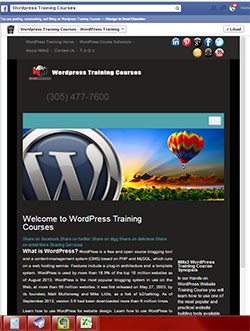
WordPress Training Courses Miami
Figure 1.1 - Facebook Page iFrame

   There are many ways to create a Facebook Page iframe style page.  One of the easiest (and free) ways is an app from Facebook called Woobox. Woobox installs in minutes and lets you create and practical Facebook Page Tab where you can direct traffic instead of your Timeline, and get real results by putting the C.C.E.(TM) formula to work for you! See Figure 1.1 for sample.

   I teach many courses in Social Media Marketing, SEO, Internet Marketing, Marketing and business, and offer a Social Media Certification course, the Certified Social Media Marketing Specialist (CSMMS) program, which consists of 13 modules, quizzes and a project. The CSMMS program is designed to make you successful in your own Social Media Marketing business, or help you get a high paying job in these topics. 

You can get more information on the CSMMS program and www.CertificationInSocialMedia.com .

Manny Sarmiento - CEO
New Media,  New Marketing, Inc.

Thursday, November 21, 2013

What is WordPress? - How to Set Up WordPress on 1and1, GoDaddy and HostGator

These are the instructions for setting up WordPress Website on your Internet Service Provider, ISP, 1and1.com, GoDaddy and Host Gator. 

GoDaddy: 


WordPress® is a personal publishing platform, or content management system, that you can use to set up a blog on your website.
To Install WordPress on Your Hosting Account
1.    Log in to your Account Manager.
2.    Click Web Hosting.
Click one of the following, based on the type of hosting you have. You can tell this by the second word in your hosting's description beneath your hosting account's domain name, e.g. Deluxe Web correlates to Web (Hosting Control Panel).

1.    Next to the hosting account you want to use, click Launch.
2.    In the Popular Apps section, click WordPress.
3.    Complete the on-screen fields, and then click OK:
·       Domain — Select the domain on your account you want to use.
·       Directory — Enter the directory after the domain name where you want to install WordPress. If you want the domain name itself to use WordPress, the directory field should only have "/" entered.
·       Enter a Username, a Password (and its confirmation), and an Email Address.
WordPress will be installed to your hosting account with the options you selected within 24 hours. When it is complete, you will receive a confirmation email.


HostGator:

 
Install WordPress via QuickInstall - Hostgator
1.     Login to cPanel.

2.     Scroll down to the Software/Services section and click on the QuickInstallicon/link.


3.     On the left, under Blog Software, click on WordPress


4.     Click on Continue.


5.     Fill out the Application URL, if needed.
Note: This is the path where you want to install WordPress. If you leave this field blank, WordPress will be installed to your main domain. If you use blog in this field, WordPress will be installed to http://yourdomain.com/blog. Don't leave this blank if you don't want WordPress to be your main website or if you already have content on the root of your account.

6.     Fill in the rest of the fields and options (the email, blog title, first and last name can be changed later through the WordPress Dashboard)

7.     Click Install Now!


8.     After WordPress is finished installing, you should see a "Congratulations!" message like the one below with a link to click here. Click that link, and it will bring you to your newly installed WordPress blog!


Your admin password will be emailed to you at the email address you provided in step 7. Retrieve your password and then visit the URL to which you installed WordPress, adding /wp-admin
Visit our login tutorial for more information on how to log into WordPress.
Note: If you recently changed your name servers or DNS records, it is possible that you will not be able to access your new WordPress installation until the domainpropagates. This could take up to 24 to 48 hours.


1and1.com


Login to 1and.com

Go to Website/Applications
                Click on “1and1 App Center”

Click on “Click & Build”

Click on “Install” in the WordPress Tab

Click “Install in Free Mode”

Accept “Terms of Use”

In General Tab /  Installation Settings
                Enter Name of the Site
                Select “Existing Domain”
                                Arrow down and select a domain

In Application Setting
                Create an Administrator LogIn (Cannot be admin”
                Create a Password
                Enter Administrator Email
                Enter Website Title
                Click “Continue”

In Database Tab
                Select “New Database”
                                Write a “Description”
                                Create a Password
                                Repeat the Password
                                Set Table Prefix
                                                Leave as Is or give it a new name
                Click Continue

In Webspace
                If only one site is hosted leave it as is
                If several sites are hosted click on “…” and create a “New” Folder

In Summary
                Click “Install”

You will see “Installing”. When WordPress installation is ready (15 min to 2 hours) 1and1 will send you an email, or you can refresh the page to see if the installation is ready.

Remember to select Linux Hosting and SQL Database Option for your hosting.

What is WordPress - WordPress Training and Classes Miami
WordPress Training and Classes Miami Courses